Wednesday, March 2, 2011

Part III: Why & how email delivery is succeeding, where eBill Consolidators are failing:

My first two blog posts on this subject dealt with why consolidators here in the US will never work. In today's post, I cover the comparison between eBill / eStatement consolidators and true electronic delivery solutions:

There are five primary areas where email delivery of bills and statements succeeds, where consolidators have and will continue to fail.

1. Biller and consumer critical mass:


Why consolidators fail: To benefit consumers; consolidators should have the majority of a customer's bills in a central location. Due to the size of the US biller market this is simply impossible.To date, even mature consolidators that have been building a base for several years, have failed to exceed 20% of the average household's bills. The new entrants to this segment are yet to realize the futility of this endeavor.

On the flip side however, biller's won't subscribe to a service without a significant percentage of their consumers already enrolled. A true chicken and egg scenario.

Why email delivery succeeds: As the bill is delivered directly into the customer's inbox, it makes no difference whether it is one email bill or several a month. Just like in the physical mail scenario, getting one bill or many is just as convenient for both biller and recipient. Most importantly, it gives each and every biller the ability to deliver bills to their customers, without the need for a location to gather a critical mass of consumers.

2. Registration / enrollment:


Why consolidators fail: A recent survey conducted by InfoTrends showed that of the 1,042 consumers surveyed, 61% said that remembering multiple unique usernames & passwords remains a significant barrier to paperless adoption. Convincing the majority of consumers to register on biller's websites has proven to be an insurmountable marketing feat. For the consolidator however, it's even worse, as the customer has to have many pieces of information at hand for each biller at that location. Add to this the fact that consumers do not want another mailbox nor to have to choose and remember yet another username and password.

Why email delivery succeeds:
Quite simple - there is no registration process. The bill arrives in the customer's existing email inbox and is opened using a secure 'shared secret' (not a password, rather personal details known to the biller and the recipient). There is no need to choose or remember anything. There are also no marketing dollars required to drive the customer to sign up for anything.

3. Paper suppression:


Why consolidators fail: For a consolidator website to be considered successful at paper suppression by any biller, they will need to achieve suppression rates in excess of 10% per year, per biller. Currently statistics show that less than 5% of consumers enroll at consolidator websites and 50% of those still don't go paperless - the math cannot hope to add up.

Why email delivery succeeds: By delivering the bill or statement as a securely encrypted email attachment, the recipient can opt to go paperless with just one click - no form to complete, no website to visit, no username & password to complete, in fact, nothing to do at all except simply receive an email.

4. Bill stuffers / electronic marketing:


Why consolidators fail:
Due to the website nature of viewing bills at a consolidator, within a multi-biller environment and along with the fact that the biller does not have any ownership of the viewing real estate, marketing to consumers at consolidator websites is a considerable challenge, if offered at all. There is certainly no advanced personalization possible.

Why email delivery succeeds: It is automated and extremely cost effective to insert and overlay marketing messages into the body of an email, the white space of the bill and entire pages inserted into the secure attachment. Furthermore, this can be personalized down to the individual recipient, resulting in a bill marketing tool that is significantly more powerful than the paper bill, the biller's own website and definitely any consolidator.

5. Mobile:


Why consolidators fail: Navigating a mobile website or downloading an app is just inconvenient, a poor user experience and requires pre-registration. In addition, paying through a mobile website is an even worse experience than just viewing it. (To date no consolidators have offered a mobile option, but we believe that in 2011 there will be a first attempt.)

Why email delivery succeeds: An email attachment can be opened on any email capable device, without the need for the recipient to do anything. In addition, the same email will be waiting on the recipient's computer for viewing later. Payment can be initiated with just a single click.

And finally it is relevant to point out that where new consolidator entrants are in start-up / concept stage, secure electronic document delivery via email has been successful in 14 countries (including the USA) for 12 years, for more than 250 large Billers and Financial Institutions, including 3 of the top 10 banks).

When considering your paper suppression strategy, do you go with a new idea that has never worked before, but is at best a 'nice' idea, or do you chose a direction with a decade of referencable, proven success stories?

Garin Toren
striata.com

Wednesday, February 23, 2011

Don't forget the basics when testing email campaigns

Email marketing is constantly evolving and a focus for many companies is split testing to ensure relevance and understanding of customer behaviour. However, it's easy to forget the basics and that's when mistakes creep in.

I have received numerous marketing and notification emails in the past few weeks which have the basics wrong: referring to me by my surname rather than first name (no title), reply not working and an unsubscribe process that requires multiple clicks to remove me from the list.

There is basic testing that needs to be carried out on every email campaign before distribution. If you have automated campaigns going out, test them every 6 months, even if they were correct when you launched them. Things change and anything can affect your campaign.

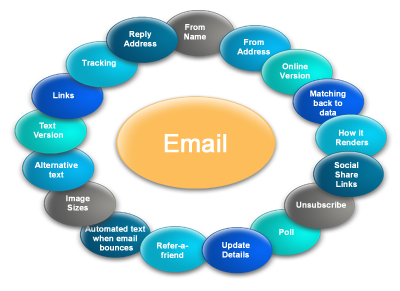
email Marketing Check listSo what are the basics?


An email is the sum of its parts. You need to test every one of those parts. Don't assume that any part of the email works if you haven't tested it.

Here are a few quick tips:


General
  • Check your email in the major browsers. Different browsers will render the email differently, so don't assume that because you checked the email in Hotmail it will look the same for everyone. Check that same Hotmail email in Chrome, IE, Firefox, Safari, etc. as each of these may render the email differently.
  • Check your email in the major email clients. HTML renders differently in different email clients. Where it looks perfect in Outlook for example, the text that should be black is purple in Gmail, so check your email in every email client possible.
  • Remember that more and more people read these emails on the go, so test how the email looks on mobile devices and how easy it is to read, click and navigate through it.
  • When last did you test the reply? Finger trouble when setting up the campaign could mean that your reply address isn't working. This is damaging to your brand and will impact on deliverability.
  • The most basic, but far too often forgotten test, is to check your grammar and spelling.

Data
  • Don't lose your customer at the salutation. Check that your personalisation and customisation match what is in your database. Always check random customer email samples against the original data.
  • Is your unsubscribe working? All too often this link goes unchecked and if it's not working, not only are you contravening a few laws across various countries, you're damaging your brand.

Images
  • Make sure your image sizes are specified. If they aren't, older versions of Outlook will stretch the images - forcing recipients to scroll left and right as well as up and down unless they download them. Newer versions of Outlook make the images 1 pixel high and wide before download.
  • Have you included alternative text behind the images? A recipient should understand the email and see all the call to action buttons without having to download the images.

Landing pages
  • Does your customisation and personalisation pull through to the online version? If you're making the effort to be relevant and customise communications, then ensure that the online version mimics the email.
  • Make sure that the online version link does not appear on the online version.
  • If you're logged into Skype, telephone numbers will be converted to a specific style with a flag, which could break the template so check your email and the online version whilst being logged into Skype.
  • Are your landing pages named correctly? They should have the name of the campaign or the subject line.

Testing email campaigns is vital to ensure their success and to preserve the reputation of your brand, so ensure you are testing thoroughly before distribution. If you still aren't sure whether or not you are covering all the basics, be sure to chat to an eMarketing specialist…

Mia Papanicolaou
striata.com

Friday, February 18, 2011

Another day, another phishing scam

I've seen hundreds of phishing emails over the past couple years. Some brilliantly written; others that wouldn't fool the clichéd blonde in a bar.

The good ones can be tricky to recognize: they seem to come from a valid service provider, are exact replicas of a real communication, and I reluctantly admit, are rather professionally done.

The bad ones are just that: BAD - Spelling mistakes, grammatical errors, broken images, inconsistent messages. I even received one branded as if from Bank A, but with a call to action for Bank B. Very confusing, and hardly likely to dupe anyone.

But yet these scams must have some level of success or the crooks would hang up their HTML and look elsewhere for easy targets.

The problem is that so many Internet users are just that: easy targets. Some believe that because they don't understand "technology", they can't arm themselves against digital-media fraud. In reality, many of the techniques used to recognize a phishing attempt, have more to do with common sense, than with being an Internet super-user.

The only way to avoid being a victim of phishing is to educate yourself.


How can you tell if an email is fraudulent?

  • Fraudsters don’t know who you are. 99.9% of email phishing is “spray and pray”, so the email is actually not directed at you personally. They happen to have your email address, but they have no other personal information about you. Don’t respond or interact with any email which is not addressed to you personally in the body of the email.
  • Fraudsters want your personal information. The purpose of a phishing email is to get information from you that enables access to your money. A phishing email will ask for your personal security information, such as your ATM pin, or your credit card number and pin. Banks will never send an email requesting your ATM or card pin. Any communication that asks you for your internet banking login or password, or anything to do with an ATM is a scam.
  • Fraudsters pray on ignorance. A phishing email is designed to look real, but there are always ways to recognize fraud. Online commerce, internet banking, email statements are all the way of the future. Which means that, unfortunately, scams will also be part of our future online experience. Get informed. Don’t be a passive Internet user.

Use common sense.

If the content of an email seems too good to be true, then it probably is. Be cautious about opening any attachment or downloading any files, regardless of who sent them. Don’t email your personal, financial or password information, EVER.

Stay on top of announcements from your Bank about their email communication and Internet Banking policies. Banks regularly update their fraud notices, as well as provide fraud detection software and tips on how to avoid becoming a victim.

If you do receive a suspicious email, take the time to report it to your Bank’s fraud division – all relevant information in this regard, as well as contact details should be on your Bank’s website.

Alison Treadaway
striata.com