Showing posts with label email deliverability. Show all posts

Wednesday, November 14, 2012

Part 4 - Improve deliverability: Essential technical setup

Throughout this series I have shared tips and tools you can use to help enhance your email deliverability. In this final instalment, I would like to take you on a journey 'behind-the-scenes' and discuss some of the technical set-up associated with deliverability.

When it comes to sending bills or marketing via email, they are rarely sent from the same domain/server where the 'FROM' and 'reply-to' addresses exist.

Consider the common scenario where company X utilizes the services of an email service provider (ESP). The IP address of the server that attempts to deliver the emails is owned and operated by the ESP, with no administrative link back to the company whose emails are being sent to outside mail exchangers.

To use an analogy, the company is using a third party courier to deliver its correspondence and it may be an unknown entity to the recipient. It is therefore necessary to use technology to prove that the courier has permission to send the package.

In the world of email, there are two accepted methods of proving that this relationship exists: SPF and DKIM.


SPF

Sender Policy Framework (SPF)


SMTP, the protocol for email, was designed so that any computer can send an email to any other computer on the Internet. While this created an open, easy-to-use system, it also relies on the sender to be honest enough not to send a mail claiming to be from somewhere else.

As we know this is not the case and spam is almost always sent from one party pretending (or spoofing) to be someone else.

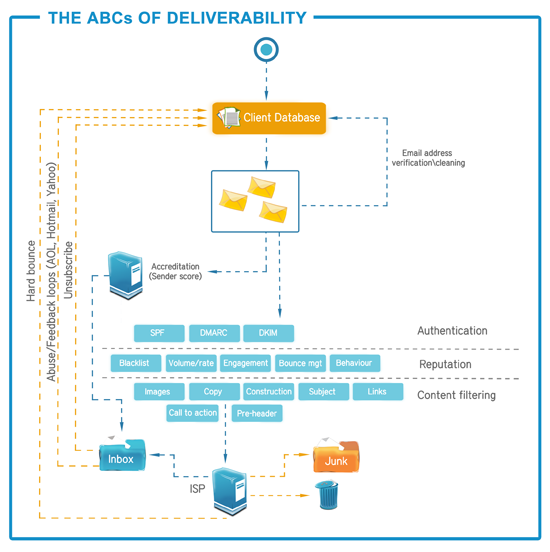
SPF was designed as an anti-forgery system and provides a way for a receiving email server to verify that the sending mail server has permission to send the email.

When selecting an ESP, it is very likely that they will send emails from their servers using your FROM address. It is for this reason that you MUST give the ESP permission to send emails using your FROM address (and domain name).

This is achieved by a simple DNS entry on your domain which lists the approved senders of your emails, including your internal mail servers.

While SPF deals with the permission to send emails from an ESP on behalf of a domain, there is a second level of authentication that deals with the ownership of the actual email message.

DKIM

DomainKeys Identified Mail (DKIM)


A common problem with nefarious email senders is that details of emails, such as the FROM address and entire contents of emails are often forged so that they appear to be generated and sent from a legitimate source.

DKIM controls this problem by making use of sophisticated cryptographic techniques in order to create a unique signature for every sent email.

In the courier analogy above, this is the same as the physical package being stamped with a keyword that only the actual sender could have possibly known, verifying that they are the actual sender and not a third party.

While DKIM signs the email going out; a DNS entry must be made on the FROM address domain in order to allow the receiving mail server to verify that the signature has been created from a trusted source. An ESP will assist with generating keys, as well as the required DNS entry.

The two methods described cater for the delivery of the message, but do not provide information on who is TRYING to spoof emails, nor do they allow a directive to the receiving mail server on what to do if they encounter spoofed or forged messages.

DMARC

Domain-based Message Authentication, Reporting & Conformance (DMARC)


Allows the domain owner the ability to be notified when forged messages are being sent to ISPs. This identifies campaigns in the email environment that are acting against the reputation and best interests of the company. Reporting is available in simple formats which can be evaluated in the case of spoofed or forged emails being sent out.

In addition to reporting, DMARC also allows the domain owner to instruct the ISPs on how to deal with a message that has been forged. This may be as liberal as allowing the messages into the inbox, or in the case of companies who are targeted in spam and phishing campaigns to instruct the ISP to delete any emails that do not have a valid DKIM signature.

In our example, SPF and DKIM acting as the mechanisms to authenticate emails equate to the security practices that can be used in the real world, such as ID badges to help prove association and stamps or barcodes to prove authenticity.

DMARC is the last link to the chain and can be compared with a receptionist who is responsible for receiving and distributing all incoming packages. By having a prior knowledge and relationship with the senders of packages and a list of defined rules on what to do when packages are not delivered from a courier with a suitable ID. This also includes packages that don’t have the correct packing slip - this person could take action depending on the circumstance.

Thanks for joining me on this exciting journey of email deliverability. I hope that you have found the deliverability blog series interesting and useful!

If you haven’t had a chance to download our new deliverability white paper '7 steps to better email deliverability', then you can do so now, simply click here.

Alex Papadopulos
striata.com

Wednesday, November 7, 2012

Part 3 - Improve deliverability: Your email has been delivered, now will it be opened?

Now that you've figured out how to get your email past the predictable technology based filters (as discussed in part 2 of the deliverability blog series),  you have to deal with something way more complicated - your customer. 

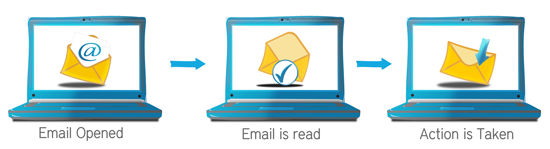
The average corporate user receives about 75 emails per day, with an increasing amount being read on mobile devices. Considering that 20% of these emails are probably spam, your number one objective is to ensure that your company’s email is opened, read and that the relevant action is taken.


email-process

Your email should always have a specific purpose, whether that is a call to action to click a link to make a purchase, view an account or simply to convey important information. There are a number of key areas where you have an opportunity to grab the recipient's attention and also take advantage of understanding how customers are interacting with your emails.

It is paramount to get as many emails opened as possible, not only for the obvious reasons applicable to the consumer but also for your reputation at an ISP. Opened emails are trusted more than frequently deleted (or emails marked as spam) and the higher the rate the greater the chances of inbox penetration and inbox placement.

What to remember about first impressions?

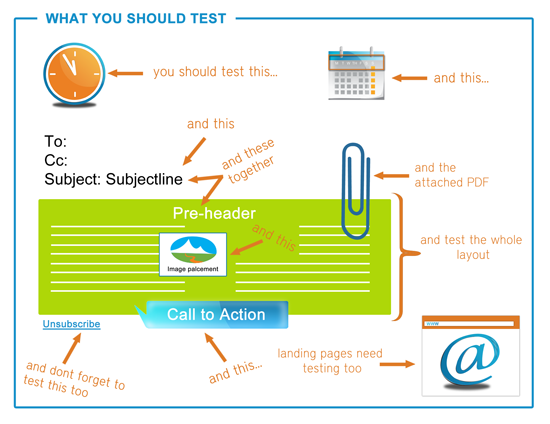
Three key elements of your email are the subject line, FROM address and pre-header. Email recipients make split second decisions and will instantly delete or send mail to the junk mail folder if they consider it to be spam.  As these are the first points of this instant evaluation, it’s important to get it right.

Here are some tips:

  • The FROM address should be recognizable and easy to read, for example name@companyname.com is often a better match than unknownname@department.division.company.com or donotreply@domain.com
  • A subject line should accurately portray the content of the email and not mislead customers in any way, so avoid using cryptic subject lines to ‘trick’ them into reading an email, it’s a sure way to lose their trust - if you are sending out payment confirmation emails for example, a subject line such as 'We have received your payment' is sufficient  
  • Have a call to action in the pre-header and be very clear about the purpose of the email. The pre-header is seen alongside the subject line in most email clients and devices and is your first piece of content that can be used to entice positive action. 

Always remember that testing variations of the above is extremely important because often, one combination will result in a higher open rate compared to another and there is no logical reason why.

Layout can also influence click rate

Recipients also base their decisions purely on the overall look and feel of the email. Does the mail display correctly in their browser, email client or mobile phone? Do the images take too long to load (if at all)?  Is the important information or call to action in the appropriate location?

The creative design of an email can be likened to photography. An aesthetically pleasing and flowing layout will be the difference between your message being received or totally overlooked.

As with subject lines, testing different layouts is important and is compounded by the fact that email clients often change the way they render emails. 

For more advice on how to structure the perfect email, be sure to download our new deliverability whitepaper '7 Steps to better email deliverability'

what-you-should-test

It may be open, but have they interacted?

After achieving your perfect layout, ensure that the call to action in your email is clear.

Placing too much copy before an action link or button will undoubtedly result in readers not even getting to it. Conversely, one large button saying “CLICK NOW” may be too intrusive. It’s a delicate balance between a pleasant looking layout, relevant information and a strong call to action.

In conclusion

Email deliverability is a complex subject but there are great tools in the market today that can help you get the most out of your emails. We discuss these tools and strategies in our new deliverability white paper '7 Steps to better email deliverability', click here to download it.

Next week is the final installment in this series. I will be taking you behind-the-scenes and discuss some technical stuff you should know about deliverability

Alex Papadopulos 
striata.com

Wednesday, October 31, 2012

Part 2 - Improve deliverability: How to glide through spam filters

We dealt with validating customer email addresses last week in this special deliverability series and today we are going to tackle the issue of spam filters.

One of the biggest concerns when sending out an email, is whether or not it will be marked as spam by any of the filters it passes through on its way to your customer’s inbox. Even when adhering to authentication  standards such as SPF & DKIM, using "warm" IP addresses and ensuring that your email lists are clean; the spam filters have the last say on your deliverability and their decision-making logic is a well kept secret.

There are no well documented algorithms, keywords or methods used to filter emails. What makes the challenge even harder, is that spam filters constantly change their rules to keep up with new methods used by unscrupulous spammers.

Just as illegitimate mass emailers learn the rules to stay one step ahead of the filter software, so too do spam filter rules change and we have to understand the parameters which cause some emails to be cast away.


Don’t get labelled as spam: structure your email correctly


If your email "looks" like spam, it’s likely to be marked as spam by the receiver. You may also find that your campaign starts off with a good  deliverability rate, but this quickly deteriorates as the filters "learn" from their users. So how do you structure your email?

The underlying HTML needs to be impeccable. There are rules that must be adhered to when building an email and simply converting a word document to HTML format will not conform to the strict standards.

  • Make sure you remove misunderstood "spammy" words and avoid using excessive punctuation or CAPS.
  • Identify yourself in the FROM 
  • Make sure your subject accurately describes the content.
  • Have the correct balance of images and test. You’ll want to send it as a Multi-part MIME email (HTML & Text versions).
  • Make your email short and sweet so that it is easy to read. You don’t want it being mistaken for spam just because at a glance you could not tell.
  • Make sure you have an unsubscribe link so people don’t click the spam button instead. 
  • Unfortunately, following the above ‘rules of thumb’ will still not guarantee that an email will go straight to the inbox.

The solution is to test, test, test

Start with your content -  test your email copy using the many free tools available, then test the entire email as a package by monitoring inbox open rates and previewing emails in multiple email clients. This is essential to an ongoing, successful email send.

Adjust and take action

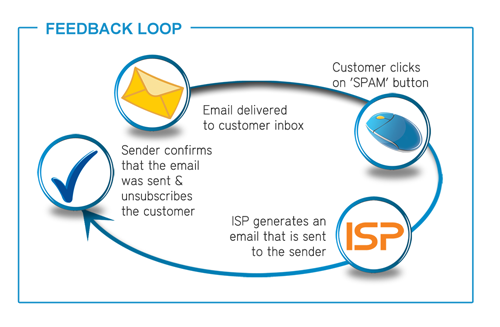
Many of the top ISPs provide a mechanism to report back to the sender whenever a mail is reported as “spam” or “junk” by the customer. Called Feedback Loops, a standardized report is returned as an email which provides the sender with the information needed to remove the email address from the list.

ISPs provide a subscription method via a web form, usually on the same postmaster site that is used to register for whitelisting. By entering into the agreement that the sender will monitor and take action on complained email addresses, the reputation is increased and the emails being sent are legitimized.

feedbackloop

In summary:

  • Create a well structured email
  • Check the content
  • Test before you send
  • Adjust if you are getting complaints or see the open rates dropping

We hope you are enjoying our email deliverability series. If you haven’t yet downloaded the white paper, why don’t you do so now? It’s full of easy to understand advice on how to improve deliverability of your emails. Plus it’s free!

Keep following the series, next week I will be covering the big topic of how you get your customers to OPEN your email!

Alex Papadopulos 
striata.com

Thursday, October 25, 2012

Email Deliverability Part 1 - Improve deliverability: validate customer email addresses

Getting the email into the inbox is so much more than just creating something that looks great, passes spam tests and having your database of addresses ready. Before hitting send it’s vital to validate the email addresses in the customer database that you are sending to. Our special deliverability blog series starts here!

This is an important step in your deliverability efforts because continually sending communications to a failed email address can result in your emails being blocked by the receiving mail server. Email addresses are captured incorrectly because of user typing errors, but all too often email addresses have been gathered over the phone or via hand written correspondence, which can then lead to misreading and input errors. The good news however is that a large percentage of these can be corrected before the first email is sent.


4 Easy steps you can take to ensure proper email validation


  1. Check email addresses for correct formatting
    This first step can be performed at its most basic level by checking for the basic structure of an email address, i.e. name@domain and excluding obvious errors such as name@nodomain.

  2. Measure emails against common rules
    By running through each email and validating against common rules, you can eliminate the incorrect email addresses. This helps your deliverability rates and also gives you the opportunity to reconnect with your customer and verify the information you have on file. This is not an intensive process, so it can be performed every time an email is sent out to avoid badly formatted emails from even attempting to enter the delivery queue.

  3. Scan for common mistakes
    Take the process one step further by searching for common mistakes. For example, a common manual input error would be recording the email domain yahooo.com instead of yahoo.com by mistake. By using a database of the most common errors, a report can be generated showing the suspected incorrect email address and suggesting the correction. Unfortunately, this method is open to mistakes and as such should always be validated manually – (for example, while Yahooo.com is almost always an input error, it is not guaranteed that this domain does not actually exist). It is also advised to remove placeholder email addresses such as no@email.com.

  4. Run every email address through a server, which does a 'live check'
    The last method to verify email addresses is the most accurate, but unfortunately, also the most intensive. It requires running every email through an application which makes a connection to the SMTP server of the domain and "asks" whether or not the email address is valid. Due to the fact that this is a live check, results can be regarded as almost 100% accurate. For larger lists, this can take a lot of time and should only be performed once (or periodically) rather than checking emails individually as they are being sent. Also use your delivery report information to remove any bounces and undeliverables from your database, as this will help you avoid spam traps.

These methods should be applied to any email list or customer database, whether marketing based emails or those that are transactional in nature, to ensure optimal deliverability.

It is important to note that, as each of these techniques has its merits and pitfalls, you’ll need to determine which one applies best to the type of email, source of the email list and number of emails you are sending out. Email is a powerful tool, so make sure it works for you.

For more strategies and tools on how to ensure your emails reach customers’ inboxes, be sure to download our new Deliverability White Paper "7 Steps to better email deliverability"

Look out for next week’s installment of this special deliverability blog series; I will be focusing on spam filters and how to avoid them.

Alex Papadopulos 
striata.com

Tuesday, October 16, 2012

How well do you deliver? Follow our deliverability blog series and make your emails count

The discipline of email distribution is riddled with acronyms and industry terms. DMARC, SPF, DKIM, CTR, pre-headers, engagement rates... are just some of the expressions that you are faced with on a daily basis when involved in sending bulk or triggered emails.


We’re making it easier for you to get in with the lingo

When it comes to sending emails, the one area that is full of the lingo that every person involved needs to know and understand is around deliverability – the art of getting your emails into your customers’ inbox. And as fantastic a tool as email is to send bills, statements, policies, marketing, promotions, lifecycle communications, letters, etc., it has to reach the recipient’s inbox in order for it to be effective in any way.

Bearing this in mind, we thought we’d share some of that knowledge with the launch of our Deliverability White Paper and Deliverability Blog Series that will give you the information you need to make your emails count!

You can download our White Paper '7 steps to better email deliverability' and make sure you’re glued to your inbox over the coming weeks as we delve into the following topics in our blog series to help you understand the subject of deliverability:


  1. Validate customer email addresses
  2. We look at why data hygiene is important in getting your emails delivered and give you some tips on fixing common errors and purging those bounces
  3. How to avoid spam filters
  4. We will give you the tips on structuring your emails correctly, appraising your content and testing the email to see the results before you send
  5. Getting customers to take action
  6. Your email has been delivered. Now what? Your customer engaging with your email is also important in deliverability, so we take you through the details and advise on how to increase engagement
  7. Behind the scenes technical stuff you need to know
  8. This blog tackles all that jargon by giving you the details you need to know and action in a manner that doesn’t make your eyes glaze over.

So why is it so important to understand the ins and outs of email?

There is usually a separation of tasks and activities between business and IT/ ESP when it comes to email distribution, with the focus on deliverability falling into IT / ESP remit. However, the processes and decisions on implementation need to be understood by everyone involved, because getting an email delivered and getting customers to engage, involves a number of moving parts, all of which have to work in unison.

Without a focus on deliverability, all efforts in sending emails to customers, is diminished. Systems, people and processes are all crucial in the quest to get emails into the inbox.

the-abcs-of-deliverability
Keen to get some expert advice on deliverability? Then be sure to sign up for our deliverability blog series

Check out our new Deliverability White Paper '7 steps to better email deliverability' as well - you can download it here

We hope that you find the information useful and if there is anything more you would like details on or if you would like to chat to an email specialist, please contact us.

 Mia Papanicolaou
striata.com